
Input, display, and output devices do not interpret digital color the same way. The gamut of colors that can be created using RGB differs from what can be created with CMYK ink on varying media. Color management plays a critical role in translating color values so the output matches the desired and expected color. In this article, we’ll go into detail on:
- What Is Color Management In Printing?
- Why Is Color Management Needed?
- Tectonics Dedication To Color Management
What Is Color Management In Printing?
Color management is the process of controlling the output of multiple presentations of an image on various output media. Here at Tectonics, this means our printed products are of the highest quality, color accuracy, and consistency across all three full production facilities. There are multiple elements involved in color management, including environmental conditions, the printer itself plus its settings, and ink restrictions.
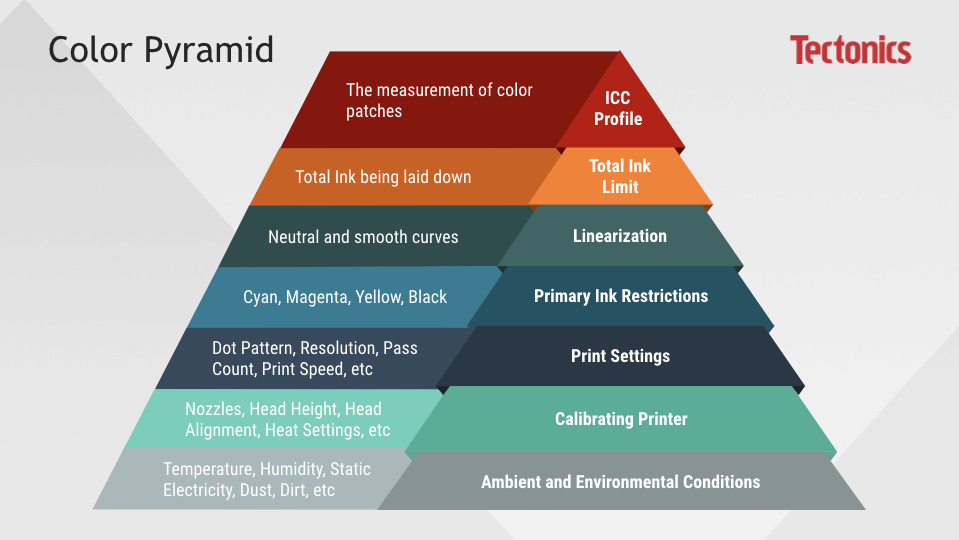
The color pyramid illustrates how these elements are related. The bottom of the pyramid, Ambient and Environmental Conditions, is the foundation of color management. Each section is built on the section below it. To manage color, printing output, and operating procedures, these are the factors that affect color. They need to be considered when controlling the printing process and the creation of color profiles.
- Ambient & Environmental Conditions: The physical environment where the printer is. Humidity control, temperature, dust, and grounding of equipment determine the stability of a printer/press.
- Calibration of Printer: Settings and adjustment of printer. This includes nozzles, head height, heat settings on machines/press, etc.
- Print Settings: RIP or Driver output settings. This includes light ink transitions, which are the point where the standard color is being laid down in combination with the lighter hue of the same color.
- Primary Ink Restrictions: Restriction of individual inks. The primary purpose is to limit the individual inks so that they stay in their purest state without transitioning or shifting to a different hue. This step can be combined in the linearization stage.
- Linearization: Neutralization. The primary purpose is to create a neutral and smooth curve. This step can be combined with Primary Ink Restrictions.
- Total Ink Limit: How much total ink is being laid down from the entire ink set. This step incorporates the primary (CMYK) and secondary (RGB) inks and ensures the inks are not bleeding into each other to create an overall sharp image.
- ICC Profile Creation: The measurement of color patches that allows printers to print with the proper colors. It is a set of data that characterizes a color input or output device, or a color space, according to standards promulgated by the International Color Consortium (ICC).
3D view of one printer’s color gamut for a specific fabric:
Why Is Color Management Needed?
Any device which attempts to reproduce color can benefit from color management. Color reproduction has a fundamental problem in that a given color doesn’t necessarily produce the same color in all devices. Variations in the elements shown in the Color Management Pyramid can all have an effect on the color output of any device.
An analogy often used to simplify this concept is a person’s interpretation of “spiciness”. Imagine you’re at a restaurant about to order a spicy dish. Although you enjoy spiciness, you have sensitive taste buds and need to be careful to request a pleasurable amount. You ask the waiter for a medium level of spiciness and he relays that request to the cook. Herein lies the problem: “medium” spiciness means one level of spice to a cook from Thailand and a completely different level to an American cook. You don’t always know which cook you’re ordering from, or what a “medium” level of spiciness means to them in pepper quantity. On top of the differences between cooks, the taster or customer can have variations between their level of spiciness as well.
Provided enough information, the waiter could act as an interpreter between you and the cook. You could undergo a one-time taste test, eating a series of dishes with an increased number of peppers in each and rating them. That information could be recorded into a personalized table you carry with you at restaurants, specifying that to you three peppers equals “mild”, five peppers “medium”, and so on. When ordering, you could then show your personal table to your waiter. The waiter now knows what your personal definition of “medium” is, and can translate that to the cook so what you receive is what you expect. Depending on the cook, the waiter may tell him to make your dish “extra mild”, knowing how each of you interpret the same concentration of peppers.
In this scenario, three things needed to happen for you to receive the level of spiciness you expected. The first was characterizing your unique sensitivity to spice in your taste test. The second was standardizing this spice based on the concentration of peppers, or the creation of your chart. Third, the waiter’s ability to use your personal table to translate your “medium” value into an “extra mild” for the cook.
These same three principles are used to manage color across locations, substrates, and print techniques. Although color profiles are more sophisticated than our spiciness example, the same core principles apply. As in the spiciness illustration, a color profile alone is insufficient for robust color management. The profile needs to be recorded in relation to standardized reference colors, and color-aware software must be able to use these profiles to translate color between devices.
- Characterize: Every color-managed device requires a personalized table, or “color profile,” which characterizes the color response of that particular device.
- Standardize: Each color profile describes these colors relative to a standardized set of reference colors (the “Profile Connection Space”).
- Translate: Color-managed software then uses these standardized profiles to translate color from one device to another. This is usually performed by a Color Management Module (CMM).
The combination of these technologies and the expertise to use them is necessary to provide you with the printed color you expect.
Tectonics Dedication To Color Management
Tectonics takes digital printing color management to the next level. From our Spectrophotometer to monitoring of environmental conditions, our dedication to color management is unmatched.
Spectrophotometer
Not only do we own a top-of-the-line spectrophotometer, but we have people expertly trained to use it. The world-class spectrophotometer helps translate information from the printer output by reading target patches set by color committees. It reads density, lightness, chroma, and hue of the printed ink and translates that data back to our color management software.
Our spectrophotometer is the only device in the world that can read transmissive (aka backlit) profiles. It has a LED bulb which is used to calibrate for UV content. If the device being used for reading target patches isn’t capable of reading transmissive materials, then profiling backlit materials is more interpretive than scientific. Subjectivity injected into the process doesn’t create consistency or accuracy. Tectonics is a data-driven manufacturer, and our dedication to color management doesn’t deviate from this philosophy. Our color profiling isn’t solely based on human visual spectrum, but driven by data to maximize output quality.
The spectrophotometer we use is also the only one in the market with a 8mm aperture. We utilize the 8mm aperture to read more color options on textiles and UV inks, maximizing our consistency and repeatability. Its automated arm measures in smooth movements, making the readings more accurate. It even has a removable head for hand-held spot color measurements. Each year, we send the spectrophotometer to Italy for recalibration. This ensures color reading accuracy.
See our Spectrophotometer in action:
All of our facilities have a version of the spectrophotometer to assist in standardization across locations. These devices allow us to perform on-going validations to ensure our machines are consistently running within tolerance levels given by the International Color Consortium (ICC).
Full Time Color Manager & Color Management Room
We have a full time, completely dedicated resource for Color Management. She is a SGIA Certified Digital Color Professional, making sure all of our facilities are printing consistently for both dye sublimation and direct prints. This color management role is critical in the characterization, standardization, and translation process.
We also have a dedicated space that is a controlled room for color management. Down to the color paint on the walls, it’s strategically designed to optimize viewing color. It contains both a frontlit light table and backlit lightbox for proper media viewing. LED 5000k neutral lights and color calibrated monitors maintain consistency. Fabric and rigid substrate samples are stored here so they can be monitored for quality.
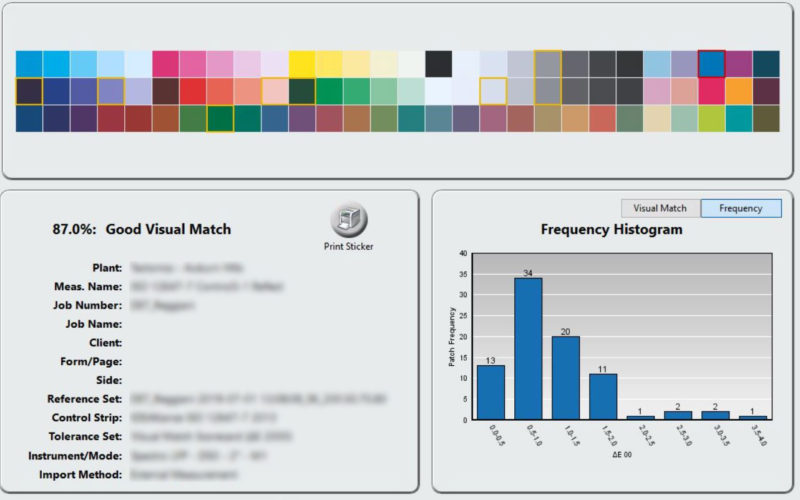
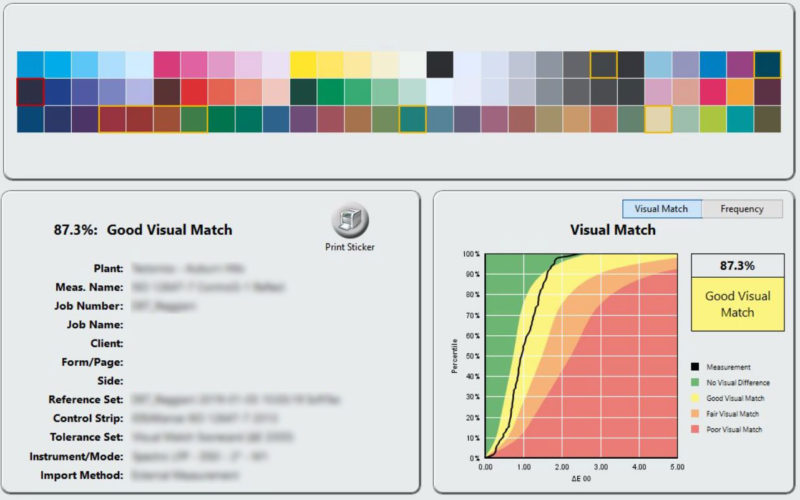
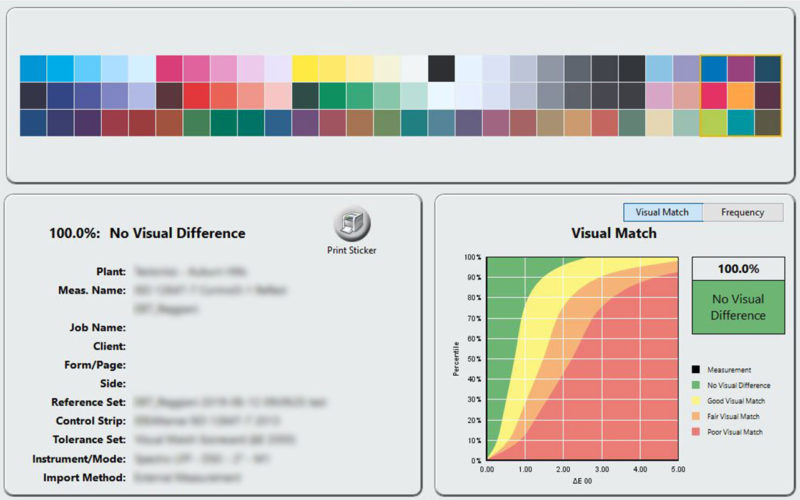
We utilize specialized software to verify and record output information over time. The software reads specific printed colors, compares them to expected color values, and provides acceptable tolerance levels. Each color receives a pass or fail, and color profiles are adjusted accordingly. Tolerance levels are set by the ICC, ensuring our adherence to international color standards. This software enables us to analytically review our color density, chroma, and hue values. We’re able to review our grey balance and make sure it’s precise.
We then use the software to analyze the consistency of output results from our machines. The software creates a reference of the output reading which is stored for future comparisons. With aggregate data, we can ensure consistency over time. Any time a change is made, for example the installation of a new print head, new prints can be compared with a reference print to assure congruence. Each printer has its own references, meaning we not only compare references of a single printer to itself, but also different types of printers against each other to visually match prints across printers, across facilities.
Screenshots of our software’s visual match data and references:
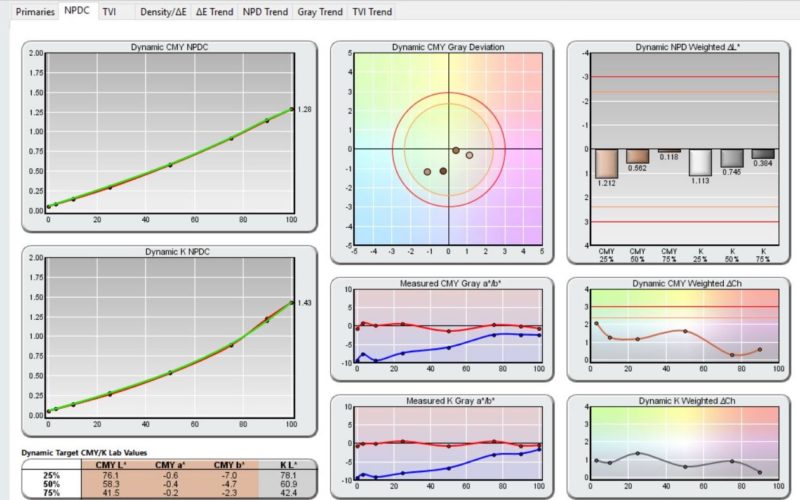
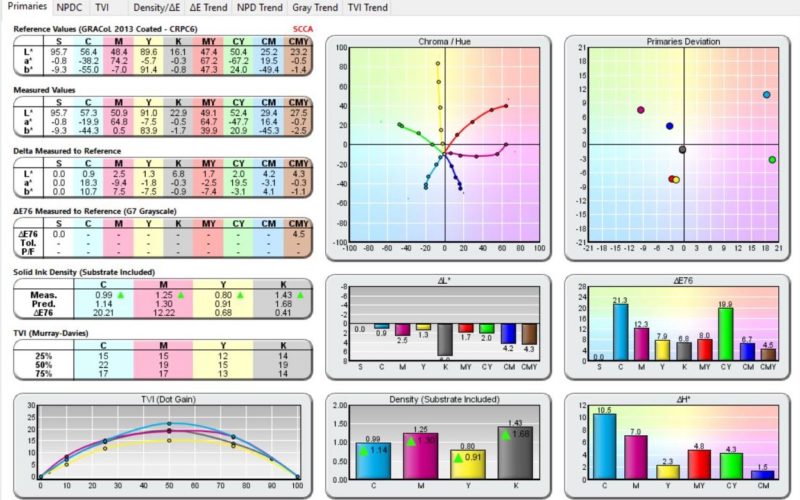
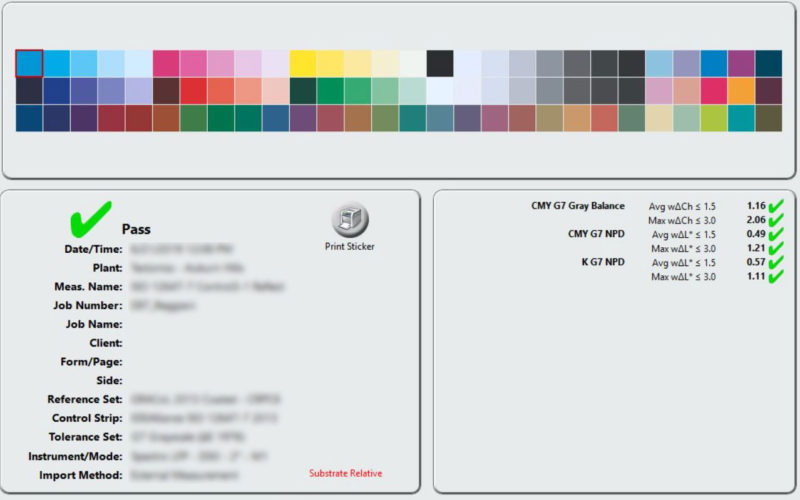
Our color management processes have been memorialized into over 100 pages of standard operating procedures. Furthermore, we’ve invested in training personnel from all locations in the practice of color management and the consistent operation of our standard operating procedures, expanding color management proficiency and operational congruity throughout the company. This ensures that, regardless of personnel or location, all customers receive the same excellence in color management.
Aside from increased quality and consistency, the standards implemented have made Tectonics more cost effective, efficient and are paving the way for increased use of automation in our processes.
Even Ray Weiss, the Director of Digital Print Programs at SGIA, is impressed:
“It’s been exciting to observe a company such as Tectonics making excellence in color management a priority. From hiring Mary Song (a SGIA Certified Digital Color Professional) as their Prepress Automation and Color Manager, to giving her the time and resources to perfect their color process, and then following through and allowing her to implement these processes across all of their facilities. They are now reaping the benefits by saving money on ink and faster time to consistent and repeatable color. I’m sure their customers, and their competitors, are taking notice.”
In addition to the dedicated Color Manager, our PrePress team has over 150+ years of combined experience working with color profiles, fabric, and substrate prints.
Environment Monitoring
As noted in the Color Pyramid, the fundamental layer of Color Management is Ambient and Environmental Conditions. We utilize sensors at various locations within each facility that monitor temperature and humidity conditions, helping to stabilize the environment. Temperature and humidity must stay within acceptable, consistent ranges to eliminate variability in print outputs.
The data from these environmental monitoring sensors is available company wide through Tectonics proprietary MIS software, providing real-time information to everyone in the company. This temperate and humidity data is recorded and stored for an entire year. It can be referenced when needed, helping ensure print color consistency across locations and equipment.
Ink Monitoring
For clean, even color, we monitor ink usage to make sure there’s printing consistency through each head. We conduct daily nozzle checks, ensuring nozzles are printing accurately and that they’re properly aligned. When new ink is received from a manufacturer, it is monitored for consistency.
We also monitor the total ink limit, ensuring colors don’t run together and our clients receive crisp prints with clean lines. Oversaturation doesn’t increase print quality, wasting ink. We employ an environmentally friendly mindset, with no desire to waste any ink.
One RIP
Even with multiple facilities across the country, we utilize a single RIP for all printers. RIP stands for Raster Image Processing. It is a software that is used to take a file, translate the information to the computer, and send that information to a printer. The RIP also handles elements of the color management process, such as file input profile, linearization, ink limits, ICC profiles, rendering intents and more, for consistent, repeatable, and scalable output. Using the same RIP throughout our locations maximizes consistency and eliminates variables.
Color, Done Right
Our commitment to color management is helping us achieve our objective of industry leadership in the adoption of best practices, automation and innovation. With an unparalleled dedication to accurate color in all of our facilities, our clients receive premium prints that are rich, crisp, and clear. Most importantly, they receive the color they expect.
Ready to get started?
Tell us about your next project, and see what superior color management can do for you.
Get in Touch
"*" indicates required fields
You May Also Like